Showing posts with label Graphics. Show all posts

Thursday, 20 June 2013

FotoSketcher 2.45 - Turn Digital Photos Into Beautiful Sketches Full Version Free Download

00:52 0
FotoSketcher is an easy to use software solution that converts the image files stored on your computer to different sketches with user-defined parameters. Although it provides a great amount of editing features, FotoSketcher remains a very easy to use application, and the main component that makes it that way is the interface. It also allows the user to modify the source image by adjusting brightness, contrast, saturation, blur and sharpen, with separate sliders to let you easily configure all these parameters. With a split screen to show you the original and the edited photo, FotoSketcher also boasts multiple parameters, which allow any user to configure the way the different sketch looks like and automatically turn photos into paintings, drawings, illustration and cartoons.

FotoSketcher 2.45

For example, you can select the drawing style and adjust edge threshold and intensity, color intensity, darken or lighten the drawing, set the level of contrast, soften edges, add a frame or add text. The drawing style includes multiple modes, such as pencil sketches, painting effects, pixilation, colored dots and other miscellaneous effects such as vivify, vintage and merge source and edited photos. While the number of features is impressive, it remains pretty easy to use, mostly thanks to the fact that the app shows preview screens all the time, allowing you to see your modifications in real time and apply them.

Newly Added:
1. Improved brushstrokes placement in Painting 7 effect to give a more painterly effect.   2. Solved a bug in the manual brush code used for Painting 7 and 8 effects, any image can be used as a brushstroke template (must be dark pixels on a white background)   3. Added a new stylized effect called Emergence 2, based on calculating an approximation of the source image using shaded triangles. The result is different Emergence and look a bit like knife painting.  4. FotoSketcher works with three image formats, namely JPG, BMP and PNG.

FotoSketcher 2.45

If you want to turn a portrait, the photograph of your house or even the picture of your pet into a black & white or color pencil sketch and then look no further, FotoSketcher will do the job in a few seconds. Some Pencil Sketch allows you to create images that seem like they have been hand-drawn by some of the best artists. FotoSketcher is clearly an effective tool that's not only freeware, but also easy to use. Just pay attention to the installer, as it also attempts to install or drop some other software tools on your system.

Available links:


How to download??
1. Click on download now
2. Wait for few seconds and then click on
Enhanced by Zemanta

Thursday, 18 April 2013

JetPhoto Studio 4.15.1 – Digital Photo Organizer And Web Publisher Free Download

12:24 0
Digital photography can be a lot of fun, but editing, organizing, and sharing your images can be a hassle if you don't have the right software. JetPhoto Studio is a sleek tool that lets users manage their photos in an attractive, intuitive environment, turning a sometimes-frustrating chore into a fun and easy activity. JetPhoto Studio's interface is well-designed and easy to navigate, with its featured arranged in commonsense menus. Users can import photos from their computers and once photos have been imported into JetPhoto Studio, there's plenty to be done with them. Users can add location data to photos using GPS tracks, tag photos with keywords, and even see the dates photos were taken with a cool and attractive calendar feature.

JetPhoto Studio 4.15.1

The program offers some basic editing tools, including resizing, cropping, and rotation, as well as controls for brightness, color, and contrast. We were especially impressed with the program's photo sharing features; users can easily create slideshows, a variety of different types of galleries, wallpapers and more. Although JetPhoto Studio can't handle heavy-duty photo editing the way a program like Photoshop can. Furthermore, you can arrange images in the album by capture time or file name (ascending or descending), as well as rotate and crop them. And use the undo redo functions, batch rename files, auto rotate with EXIF information, as well as create a slideshow, flash wallpaper, screensaver and others.

Features of JetPhoto Studio:
Needn't to have a Photoshop, JetPhoto Studio is also integrated with some built-in easy-to-use image editing tools, such as intelligent enhancing, rotating, cropping, color balance, brightness, contrast adjusting, B&W or sepia effects.

1. Organize photos:
JetPhoto Studio provides a series of functionalities to organize photos (or videos) by EXIF metadata notes keywords and time and geo data. You could set descriptions or keywords for your photos. When you need search photos, just type the keyword, the thumbnails of the matched photos will be spotlighted.

2. Works with Flickr:
Flickr is a popular web photo sharing service. JetPhoto Studio helping Flickr users organize photos on their home computer. With JetPhoto Studio, you can add photo descriptions with notes, tag photos with keywords, and getting photos with GPS locating. With a few simple clicks, you can upload your photos, or a whole album and Photo location onto Flickr.

3. Photo Map/ Drawing:
Every photo or video managed by JetPhoto can have a latitude-longitude coordinate value to specify the locations they were taken. JetPhoto Studio enables users to review and browse photos with an enclosed map on which to show photos locations. Drag the mouse on the map; you can select a rectangle to quickly pick out photos taken in the specified area. Which city, which street, which corner, which place, Where did where did I take this photo…??

JetPhoto Studio 4.15.1

Moreover you can upload your album to Flickr, batch resize photos and add watermarks, locate images on maps or with GPS, merge GPS metadata into JPEG or RAW files, link photos to Google Earth and more. The program runs on a low to moderate amount of system resources, can guide you to an online user guide and didn't display any errors and its response time is very good. JetPhoto Studio is a pretty good application for creating & publishing albums to various sources.

Available links:


How to download??
1. Click on download now
2. Wait for few seconds and then click on
Enhanced by Zemanta

Monday, 11 March 2013

Funny Photo Maker 1.16 - Includes Gorgeous Frames, Face Fun and Effects Full Free Download

22:57 2
Funny  Photo  Maker  is  a  handy  and  reliable  application  designed  to  help  you  personalize  your  photos  with  unique  effects.  Funny  Photo  Maker  lets  you  enjoy  photo editing.  Helps  you  export  photos  in  image  file  and  gif  animation.  Easily  turns  your  photos  into  artistic  and  interesting  masterpiece!!  Funny  Photo  Maker  has  a  user  friendly  interface  that  enables  you  to  fast  comprehend  and  use  the  powerful  program.  Editing  process  is  simplified  into  2  steps:  Design  &  Output.

Funny Photo Maker 1.16

No complicated graphic editing knowledge required. You can add frames plenty of amazing effects then get your photo edited within seconds. With Funny Photo Maker, photo editing is just like a piece of cake!! Funny Photo Maker is a 3-in-one photo editor that includes three kinds of photo editing functions: Artistic & Frame.

If you want to be Wolverine of the X-Men or Bella from the Twilight saga, then this app is for you. Funny Photo Maker from AnvSoft is a free photo editor that lets you crop faces to frames, movie posters, and funny backgrounds. 1. Gorgeous artistic 3D photo editing effects   2. New frames and effects free updated all the time   3. Face Fun affects popular stars, animals, movie scenes, etc   4. Supports output in high quality image format such as bmp, jpg, png, etc.   5. Able to export with fabulous animated effects in GIF formats for sharing online.

Funny Photo Maker 1.16

There are many custom options under each function helping you create unique photos for sharing. You can design photo as you like by adding gorgeous photos effects, delicate photo frames and funny background. Funny Photo Maker brings life to your photos and lets your photo editing become an aesthetic Gorgeous, Outstanding and interesting creation process.


How to download??
1. Click on download now
2. Wait for few seconds and then click on
Enhanced by Zemanta

Tuesday, 19 February 2013

PhotonFx Easy Website Pro 5.0.23 Unlimited Edition Multilingual Full Version

14:27 0
PhotonFX Easy Website Pro is an editor for creating web-sites, suitable for both novice and experienced master. It has powerful features to generate professional web sites from website templates and publish them to the Internet. No HTML knowledge is required! Import your pictures and create thumbnails in one click. Use buttons, MP3s and even video-clips. You can also create Meta tags, colored/ highlighted scrollbars and intros.

PhotonFx Easy Website Pro 5.0.23

Features of PhotonFX Easy Website Pro:
  • E-mail Contact Forms
  • Publish your website to the internet
  • Build your website with a few clicks
  • Insert .mp3, .mpeg, .avi and .swf files
  • Editable templates, themes, buttons, logos, intros
  • Apply any color to background, foreground, text and links

PhotonFX Easy Website Pro countenance without any knowledge of html to build your unique web site with a layout template, logos, buttons, with the ability to import their user images and media files. Insert a flash page is not difficult, all the necessary software automatically creates html. Administrate of color elements, creating titles, adding content all in a visual mode in the interface.


How to download??
1. Click on download now
2. Wait for few seconds and then click on
Enhanced by Zemanta

Sunday, 20 January 2013

Vectorian Giotto - Free Flash Animation Package

20:26 0
Vectorian Giotto 3.0.0 has a powerful yet very simple user interface that will allow you to quickly and easily create professional Flash animations for websites. Even if you had no experience whatsoever with animation or graphics tools before, you can learn to use Vectorian Giotto effectively within 10 minutes. With easy to use interface, sophisticated/ morphing, stunning built-in effects, sound & scripting, an expert designer will do much more in less time, while the beginner will find it very easy to make incredible, professional looking movies.

Vectorian Giotto 3.0.0

The program may still feel a little overwhelming to the first-time user, but we’d recommend following the basic animation tutorial on the Vectorian website, which will quickly introduce you to the basics of Flash animation and reveal how simple it is to do. Once your first animation is up and running. You can preview your animation inside Vectorian Giotto without launching a browser or external player. Creating animations with Vectorian Giotto requires absolutely no knowledge of programming or scripting with stunning built-in effects and scripting .

Some key features of Vectorian Giotto:

ANIMATION – Full Power of Flash at Your Fingertips:

1. Filters,  2. Sound,  3. Effects,  4. Transparency,  5. Shape Morphing,  6. Blend Modes Shape Animation

DRAWING TOOLS – Powerful Scalable Graphics Drawing:

1. Simple Shapes,  2. Custom Shapes,  3. Text tool,  4. Freehand Shapes,  5. Eraser tool,  6. Fill Transformation,  7. Free Transformation

MOVIE ORGANIZATION – Reuse & Cus Existing Elements:

1. Scenes,  2. Buttons,  3. Library,  4. Movie Clips,  5. Movie Browser

In addition, it supports layers and gradient fills as well as intersection, union and difference operations on objects. Combine and manipulate text, images and shapes to create Flash movies. You can set key animation parameters as dimensions, background/ contextual and related color plus frame rate.

Vectorian Giotto 3.0.0

Animation is based on simple motion tween concept: set-up start and end look of objects and Giotto does the rest by itself. You are able to transform your creative ideas to cool banners, preloaders, navigation menus, and other flash artworks, with an impressively short learning curve! Vectorian can be your companion in enhancing the experience of your website visitors & creating WOW effect.


How to download??
1. Click on download now
2. Wait for few seconds and then click on
Enhanced by Zemanta

Wednesday, 16 January 2013

Inkscape 0.48.2.1 - Open Source Freeware Substitute of Adobe Illustrator and Coral Draw

14:27 1
Inkscape is an Open Source vector graphics editor, with capabilities similar to Illustrator, Freehand, CorelDraw, or Xara X using the W3C standard Scalable Vector Graphics (SVG) file format. Supported SVG features include shapes, paths, text, markers, clones, alpha blending, transforms, gradients, patterns, and grouping. Inkscape also supports Creative Commons meta-data, node editing, layers, complex path operations, bitmap tracing, text-on-path, flowed text, direct XML editing, and more. It imports formats such as Postscript, EPS, JPEG, PNG, and TIFF and exports PNG as well as multiple vector-based formats.

Inkscape 0.48.2.1

Inkscape's main goal is to create a powerful and convenient drawing tool fully compliant with XML, SVG, and CSS standards. With Inkscape you will have support for most digital image files , a tool palette to draw and add, shapes, lines and the ability to tweak each element individually vintages plus without affecting the rest of the composition.

Inkscape 0.48.2.1

Beginners without previous vector graphics experience may find the Inkscape interface a little crushing. If you are unfamiliar with vector graphics, take the time to visit the tutorials included with your Inkscape by going to “Help” and selecting Tutorials to walk you through the basics of creating vector graphics. Define your preferences by going to “File” and selecting “Inkscape Preferences”. This menu allows you to fine-tune your Inkscape experience.

Some Key Features:

1. Text Support:
Inkscape can use any font that is currently installed on your machine to create fully editable, multi-line text in your graphic, including line and letter spacing. You can create text on path, with both elements remaining editable.

2. Export Bitmap:
Though Inkscape is a vector graphics editor, you can easily export your work to a bitmap PNG file. You can choose to export the entire page, drawing, selection or custom portion of the page.

3. Object creation & manipulation:
Inkscape includes a variety of tools to help you create the perfect vector graphic. Drawing tools include the pencil tool for freehand drawing while the caligraphy tool allows you to draw freehand using filled paths. Manipulation Manipulation tools include standard cut and paste, layers and the other alignment tools.

Inkscape 0.48.2.1

One of the strongest points of Inkscape is their wide selection of filters and effects. You can add texture, color and light touch of an object and achieve professional drawings. Inkscape is a free with open project in constant evolution also a community which facilitates documentation behind to achieve their potential. We took aim to maintain a thriving user and developer community by using open, community-oriented development process and by making sure Inkcape is easy to learn, to use, and to extend.


How to download??
1. Click on download now
2. Wait for few seconds and then click on
Enhanced by Zemanta

Thursday, 3 January 2013

Funny Photo Maker 2.2.2 - Includes Gorgeous Frames, Face Fun and Effects

21:27 0
Funny Photo Maker is a handy and reliable application designed to help you personalize your photos with unique effects. Funny Photo Maker lets you enjoy photo editing. Helps you export photos in image file and gif animation.

Easily turns your photos into artistic and interesting masterpiece!! Funny Photo Maker has a user friendly interface that enables you to fast comprehend and use the powerful program. Editing process is simplified into 2 steps: Design & Output.

Funny Photo Maker 2.2.2

No complicated graphic editing knowledge required. You can add frames plenty of amazing effects then get your photo edited within seconds. With Funny Photo Maker, photo editing is just like a piece of cake!! Funny Photo Maker is a 3-in-one photo editor that includes three kinds of photo editing functions: Artistic, Frame and Face fun.

Some key features of Funny Photo Maker:

1. Completely free of charge
2. Gorgeous artistic 3D photo editing effects
3. New frames and effects free updated all the time
4. Face Fun affects popular stars, animals, movie scenes, etc
5. Supports output in high quality image format such as bmp, jpg, png, etc.
6. Able to export with fabulous animated effects in GIF formats for sharing online.

There are many custom options under each function helping you create unique photos for sharing. You can design photo as you like by adding gorgeous photos effects, delicate photo frames and funny background. Funny Photo Maker brings life to your photos and lets your photo editing become an aesthetic, Gorgeous, Outstanding and interesting creation process.

Funny Photo Maker 2.2.2

What's new in this version??

1. Improved the funny effects of some Artistic templates
2. Added twelve Artistic templates and five Frame templates
3. Improved the function of expanding and collapsing templates

If you want to be Wolverine of the X-Men or Bella from the Twilight saga, then this app is for you. Funny Photo Maker from AnvSoft is a free photo editor that lets you crop faces to frames, movie posters, and funny backgrounds.

Available links:


How to download??
1. Click on download now
2. Wait for few seconds and then click on
Enhanced by Zemanta

Wednesday, 7 November 2012

PhotoShine 3.5 Include Patch Full

12:05 0
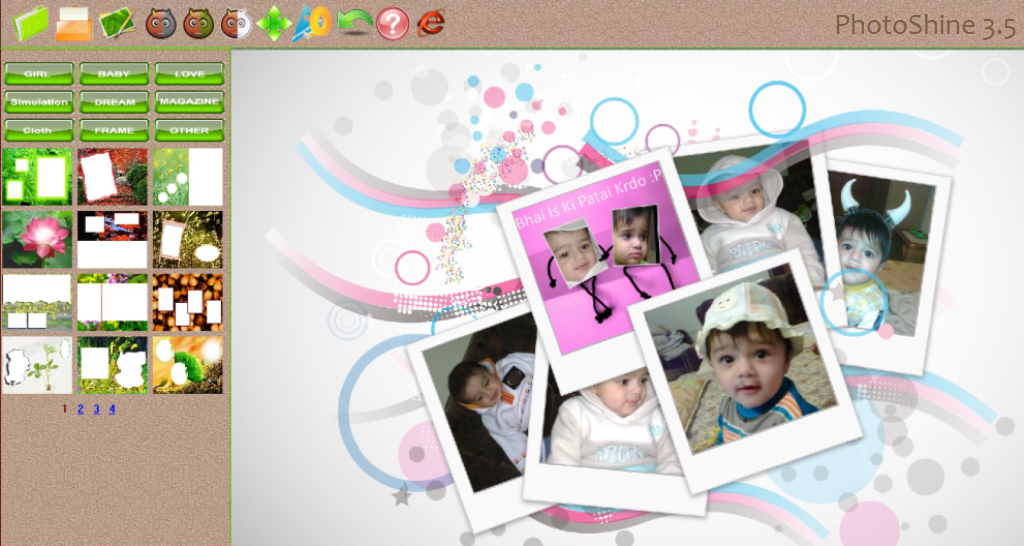
PhotoShine is an application created to help you edit your photos using different beautiful templates. Add your photo into a classical love style template, a pink girl style template, a baby cartoon template, or a magazine cover template etc by just one click in PhotoShine also it is very easy to use.

PhotoShine 3.5 Include Patch Full

Offers everyone feel like a star. We need to take the appropriate format for the photo, and then choose one of the "star" pattern. One press of a button - and then, you're in television, you on the cover of the magazine,you are on the advertising posters. 

And no need to painstakingly cut out your own image to paste it somewhere, carefully removing inconsistencies, as was the case previously for the same purpose the hand. The more sophisticated technology of today, the more photo editing software that spreads widely used by users such as Adobe Photoshop, Photoscape, PhotoShine and so forth, there are many more.

Features:
Easy to use, One click you can add your photo into the template which you like.

9 themes (styles), includes more than 700 beautiful templates. 9 themes: Girl, Baby, Love, Simulation, Dream, Magazine, Cloth, Frame and Other.

There are more than 700 templates included in PhotoShine, which means you have more than 700 options to make the photo more attractive.


How to download??
1. Click on download now
2. Wait for few seconds then click on
Enhanced by Zemanta

Sunday, 14 October 2012

Photo! Editor made fun and easy!

14:14 1
Photo! Editor is powerful multifunctional software offering a complete set of image editing tools. It contains anything a digital camera owner might need to correct or enhance their photos. You will enjoy the ultimate convenience and professional approach provided by each of the tools.

With Photo! Editor, you can remove red eye instantly, enhance the color of the image, make funny caricatures, add astonishing lighting effects, straighten, re sample and crop images. the Denise tool is one of the world's best to effectively remove luminescence and color noise from digital images made under poor lighting conditions  you will also appreciate the Make Up tool that offers a complete set of retouching filters to make the best of your portrait photos.

Photo! Editor made fun and easy!

Features Photo! Editor:

1. Fix Red Eye
The Fix Red Eye tool allows you to quickly and easily remove red eye from your photos. An image can be fixed automatically (no manual selection is needed in the vast majority of photos) or edited in manual mode.

2. Enhance Color
The Enhance Color tool contains a number of advanced tools for adjusting image color balance, contrast, brightness and saturation. An image can be fixed automatically (default color correction will be performed) or edited in manual mode.

3. Deblur
The Deblur tool lets you sharpen blurry images. The tool uses an advanced method that makes it possible to improve even heavily blurred pictures.

4. Caricature
The Caricature tool lets you create funny caricatures transforming photos with special warping effects.

5. Make Up
The Make Up tool contains a complete set of retouching filters for portrait enhancement.

6. Re-sample
The Re-sample tool allows you to re-size images enlarging or reducing them without image quality loss.

7. Crop
The Crop tool lets you crop images conveniently bringing out the most attractive details.

8. Denoise
The Denoise tool developed in VicMan's Research Lab uses one of the world's best technologies to effectively remove luminance and color noise from images made under poor lighting conditions. It provides an excellent quality of processed photos, no matter whether an image is fixed automatically or edited in manual mode.

9. Batch processing
Photo! Editor allows you to edit your images in batch mode. Batch processing lets you quickly edit multiple photos with minimal effort. You can process batches of images easily using Windows Explorer context menu. Just highlight several files, right-click on them and select the desired tool.


How to Download??

1. Click on download now
2. Wait for few seconds and then click on

Enhanced by Zemanta